

Up and running Mongodb with C#
Following is the step for up and running Mongodb with C#
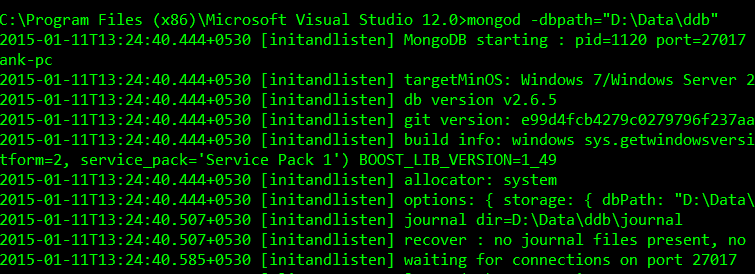
Here is the output generated by mongod command on my machine
And output generated by mongo client

After executing mongod command it create some files and allocate few space on disk for data storage. Open a visual studio editor and create a new console project. To install mongodb official drivers using nuget package manager console and type the following command into the console

Download the Mongodb package from here
Mongodb package come with binary executable and msi (Microsoft Installer) in 32bit and 64bit version. I would prefer to use 64bit msi version if your OS is capable of.Here is the url to download from.Running mongod instance server
After installing your package to run mongodb instance server open a command prompt window and execute commandmongod -dbpath="<your database storage path>". To test every thing is OK run a mongo client executable from command prompt to connect with running server. Use this command below like that mongo. mongo client automatically connect to the localhost server with default port 27017. To know more about the mongod and mongo command use -help argument.Here is the output generated by mongod command on my machine
After executing mongod command it create some files and allocate few space on disk for data storage. Open a visual studio editor and create a new console project. To install mongodb official drivers using nuget package manager console and type the following command into the console
PM> Install-Package mongocsharpdriver It will install the most recent driver for you. If you are interested in particular version of driver use -version command argument to specify in nuget command.Lets write the first code to connect to our mongodb server
namespace MongoFirst
{
    using MongoDB.Bson;
    using MongoDB.Driver;
    using System;

    public class Program
    {
        static void Main(string[] args)
        {
            // create a client object
            MongoClient client = new MongoClient("mongodb://localhost:27017/"); // mongodb connection string
            // create a server object
            MongoServer server = client.GetServer();
            // create a database object with database name "test"
            MongoDatabase db = server.GetDatabase("test");
            // get collection object cars from test database
            MongoCollection cars = db.GetCollection("cars");
            // insert documents
            cars.Save(new Cars { Name = "Mongodb" });
            cars.Save(new Cars { Name = "Oracle" });

            // loop throug each item in cars collection
            foreach (var car in cars.FindAllAs())
            {
                Console.WriteLine("Database : {0}", car.Name);
            }

            Console.ReadKey();
        }
    }

    public class Cars
    {
        // a collection always have a field '_id' in mongodb,
        // you can also use different type rather that ObjectId here
        public ObjectId Id { get; set; }
        public string Name { get; set; }
    }
}
You can also specify mongodb database name in connection string. For more details about the mongodb connection string visit hereShare On


 Posts

